
Getting body proportions to look different in a photo — without it looking obviously edited — has always demanded serious retouching expertise. Whether you’re a content creator testing a new visual style, a fitness professional building client motivation imagery, or a fashion team previewing silhouette options, the process has traditionally been slow and technically unforgiving.
That’s why an AI Body Editor built specifically for body reshaping has become such a practical tool: upload a full-body photo, choose your target shape, and the AI delivers a clean, realistic transformation in seconds — no editing skills required.
What Is an AI Body Editor?
An AI Body Editor is a browser-based tool that uses artificial intelligence to analyze and reshape body proportions in a photo automatically. Rather than manually warping pixels with a liquify brush, the system reads the full-body image, identifies the figure within it, and applies targeted silhouette changes based on the body style the user selects.
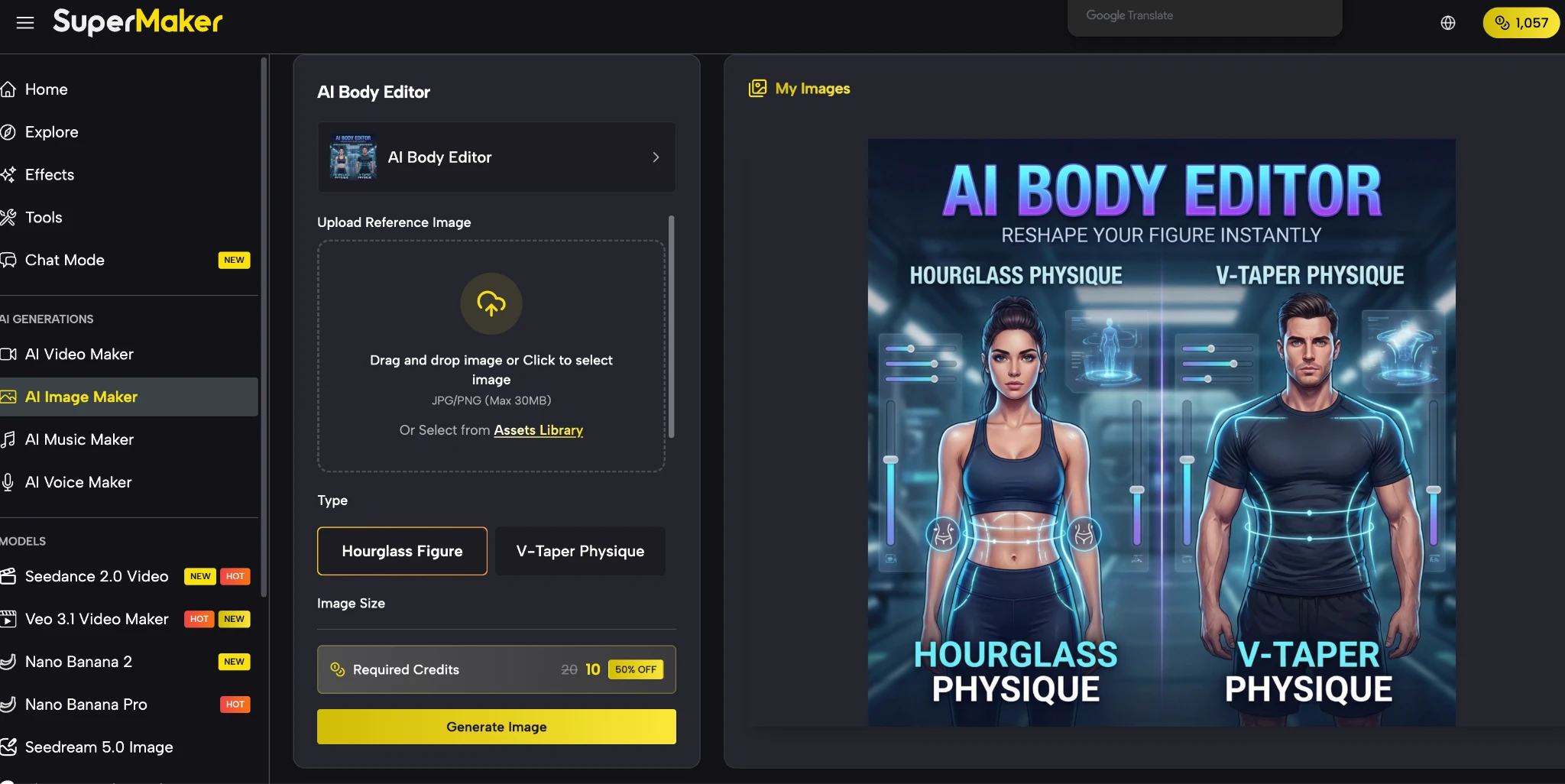
SuperMaker’s AI Body Editor offers two distinct transformation directions: a Hourglass Figure option for women, which refines the waist and balances curve distribution for a softer, more defined silhouette, and a V-Taper Physique option for men, which broadens the shoulders and tapers the waist toward a stronger, more athletic upper-body shape. These are not generic filters — they apply structured reshaping logic that is calibrated to the specific proportional characteristics of each body style, producing results that remain anatomically believable rather than artificially exaggerated.
Why Creators and Professionals Need an AI Body Editor
Body reshaping in images comes up across a surprisingly wide range of legitimate creative and professional contexts. It is not a niche requirement — it is a recurring need that most visual content workflows eventually encounter:
- Fashion and e-commerce — Style teams need to visualize how garments present on different silhouettes without staging multiple shoots for every variation
- Fitness and personal branding — Personal trainers and coaches create goal visualization imagery and motivation content that benefits from clean, believable body proportion adjustments
- Social media content — Influencers and lifestyle creators test visual directions for profile photos and campaign images before publishing
- Creative concept work — Designers, marketers, and production teams use body shaping tools to explore visual options quickly during the planning phase
- Character and fashion illustration reference — Artists use transformed photos as proportional references for stylized character designs
What all of these use cases share is the same core requirement: changes that look natural and intentional, not distorted or obviously manipulated. This is where AI-driven reshaping has a decisive advantage over manual editing tools.
How to Use SuperMaker’s AI Body Editor
SuperMaker AI provides one of the most streamlined and capable AI Body Editor workflows available online, running entirely in your browser with no software installation. The process takes just three steps:
- Upload your full-body photo — Drag and drop or click to upload a JPG or PNG image (up to 30MB). The tool works best with a clear, full-body image where the entire figure is visible from head to toe, with balanced lighting and a natural standing pose. You can also select an image directly from the Assets Library if you have previously uploaded assets saved there.
- Choose your body shape type — Select either Hourglass Figure for a female silhouette transformation or V-Taper Physique for a male inverted triangle result. You can also choose your preferred output image size from a range of aspect ratios including 1:1, 4:3, 3:2, 2:3, 3:4, and 4:5 to match your intended publishing format.
- Generate and download — Click Generate Image and the AI processes the transformation in seconds. Preview the result, compare it with the original, and download the final image at full resolution when you’re satisfied.
The entire workflow is designed around simplicity — there is no complicated prompt engineering required, no layer masking, and no manual brushwork. You make two decisions (body type and image size), and the AI handles the rest.
Key Features of SuperMaker’s AI Body Editor
Several capabilities make SuperMaker’s tool stand out from simpler body-editing alternatives:
- Two targeted body shape presets — Hourglass Figure and V-Taper Physique are purpose-built transformations, not generic sliders, meaning the AI applies reshaping logic specific to each body style’s proportional characteristics
- Face, clothing, and background preservation — The AI is specifically designed to protect facial identity, skin tone, clothing texture, pose coherence, and background composition through the transformation, avoiding the stretched limbs and warped backgrounds that lower-quality tools produce
- Realistic proportions over extreme distortion — The tool prioritizes believable silhouette changes that keep the body anatomically reasonable, which is essential for outputs that need to look like real photographs
- Multiple output aspect ratios — Choose from a wide range of image size formats to suit different publishing platforms, from square social posts to portrait-oriented profile images
- Fast browser-based workflow — No downloads, no plugins, no account setup friction — upload, select, generate, and download entirely in the browser
- Part of a broader creative suite — SuperMaker AI combines the body editor with image generation, video creation, audio tools, and voice synthesis, so edited assets can flow into larger multimedia production pipelines
Tips for Getting the Most Natural-Looking Results
The quality of the transformation depends significantly on the source image you provide. These practical guidelines will help you consistently get the most polished output:
- Use a clear, full-body image — The AI body reshaping works best when the entire figure is visible from head to toe. Cropped images, extreme close-ups, or photos where the lower body is obscured will limit the tool’s ability to apply a clean, proportionally balanced transformation.
- Choose images with balanced, even lighting — Strong directional shadows or heavily backlit photos can interfere with the AI’s ability to accurately read body contours. Well-lit images in natural or studio light produce the cleanest results.
- Opt for front-facing or slightly angled poses — Straight-on and three-quarter angle photos deliver the most stable and visually convincing transformations. Heavily foreshortened angles or side profiles are harder for the reshaping model to process cleanly.
- Select the right aspect ratio for your use case — Before generating, think about where the image will be published. A 1:1 ratio suits Instagram posts, while 4:5 works better for portrait-oriented feeds, and 3:2 is ideal for horizontal blog or website banners.
- Use the Assets Library for repeated workflows — If you regularly work with the same set of images, saving them to the Assets Library speeds up the workflow significantly and keeps your creative sessions organized.
- Generate and compare — The clearest way to evaluate a result is side by side with the original. SuperMaker’s interface makes this comparison easy, allowing you to refine and regenerate before committing to a download.
Who Benefits Most from This Tool?
- Fashion brands and e-commerce teams use the tool to test how garments read on different silhouettes without the cost of multi-model photo shoots, making size-inclusive visual merchandising more practical at any production scale.
- Event organizers and experiential marketers leverage ai photo booth technology and automated editing tools to deliver instant, customized, and high-quality portraits to guests at corporate functions, brand activations, and private gatherings.
- Personal trainers and fitness coaches create compelling goal visualization imagery and motivational content for clients using clean, realistic body transformation references generated from a single source photo.
- Social media influencers and lifestyle creators test visual presentation directions for profile photos, brand partnership content, and campaign imagery before committing to a final creative direction.
- Marketing and creative teams use the tool during campaign planning to rapidly generate multiple visual body style options for comparison, saving significant time and production cost in the concept phase.
- Everyday users who want to explore how a different silhouette might look in a polished image — without learning advanced retouching software — find the two-click workflow genuinely accessible and the results convincingly natural.
Reshape Your Body Photos in Seconds Today
Body proportion editing no longer needs to be a slow, skill-dependent process prone to visible artifacts. With SuperMaker AI’s AI Body Editor, you get a clean, targeted transformation — Hourglass Figure or V-Taper Physique — delivered in seconds, with facial identity, clothing, and background preserved throughout. Upload your full-body photo, choose your shape, and let the AI do the rest. Your best silhouette is just one click away.